Self-Hosting and Hybrid Cloud: My Personal Infrastructure with Gitea and Scaleway
A write-up on building my personal infrastructure: migrating from GitHub to self-hosted Gitea, and deploying ephemeral network labs on Scaleway. All powered by Proxmox and Wireguard.
Context and motivations
As a network engineer working in automation and orchestration, I’ve always needed an environment to experiment and learn in. Until recently, I used GitHub for my code and ContainerLab locally/on AWS via DevPod for my network simulations.
But several needs emerged:
- Learning: Deploying and managing a full Git server with CI/CD
- Sovereignty: Hosting my data in France (or at least in Europe), controlling my infrastructure
- Flexibility: Being able to spin up network labs on demand without saturating my local machine
- Automation: Scripting the complete provisioning of my environments
The overall architecture
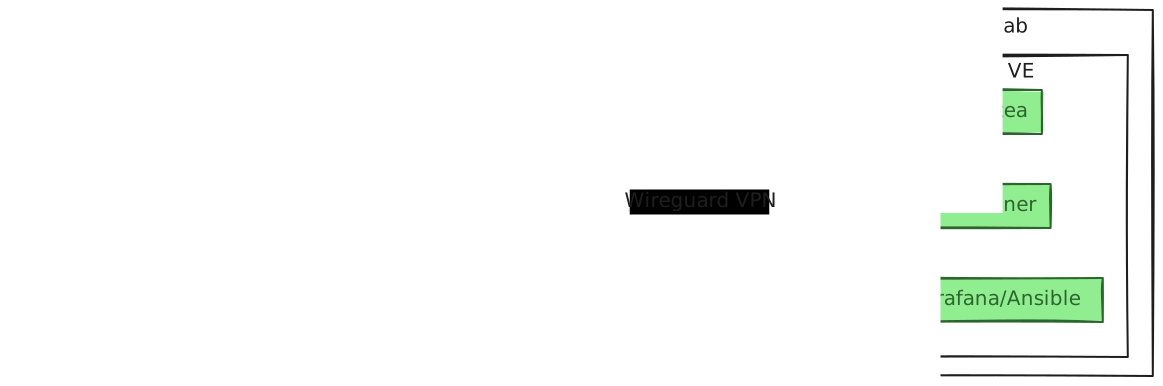
Tech stack
Homelab:
- Proxmox VE: Hypervisor for VMs and LXC
- LXC Containers: Gitea, runners, various services
- Ansible: Configuration management and updates
- Grafana/Prometheus/Loki: Monitoring and observability
Public exposure:
- Scaleway Dedibox: Dedicated instance with a fixed IP
- Nginx Proxy Manager: Reverse proxy with automatic SSL
- Wireguard VPN: Secure tunnel between Scaleway and the homelab
Scaleway Cloud:
- Object Storage: Hosting for the Hugo blog (S3-compatible)
- Instances: Ephemeral network labs provisioned on demand
- Scaleway CLI: Full automation
Part 1: migrating from GitHub to self-hosted Gitea
Why Gitea?
Gitea is a lightweight Git server, perfect for self-hosting:
- Lightweight: Ideal for an LXC on Proxmox
- GitHub Actions compatible: Migrate workflows without rewriting them
- Full-featured: Issues, PRs, CI/CD, webhooks
- Open-source: Active community
Deployment with Proxmox Helper Scripts
Rather than configuring everything manually, I use the excellent Proxmox Helper Scripts, which automate the creation of preconfigured LXCs.
Installing Gitea:
# On the Proxmox node, run the script
bash -c "$(wget -qLO - https://github.com/community-scripts/ProxmoxVE/raw/main/ct/gitea.sh)"
The script:
- Creates a Debian 12 LXC
- Installs Gitea and sqlite
- Configures the systemd services
- Sets up the environment with the correct permissions
Post-installation configuration:
- Web access:
http://<IP_LXC>:3000 - Initial setup via the interface
- Site URL:
https://gitea.arnodo.fr
Network architecture: Wireguard + Nginx Proxy Manager
The problem: Gitea runs inside my homelab (private IP), but I want to access it from the Internet.
The solution:
- A Scaleway Dedibox with a fixed public IP and Nginx Proxy Manager
- A Wireguard VPN between the Dedibox and the homelab
- The reverse proxy routes
gitea.arnodo.frto the LXC’s private IP through the tunnel
Wireguard configuration (homelab side):
[Interface]
Address = 10.0.0.1/24
PrivateKey = <private_key>
ListenPort = 51820

[Peer]
# Dedibox Scaleway
PublicKey = <dedibox_public_key>
AllowedIPs = 10.0.0.2/32
Endpoint = <dedibox_public_ip>:51820
PersistentKeepalive = 25
Nginx Proxy Manager:
- Proxy Host:
gitea.arnodo.fr - Forward Hostname/IP:
10.0.0.x(Gitea LXC IP over Wireguard) - Forward Port:
3000 - SSL: automatic Let’s Encrypt
- Websockets: Enabled
Management with Ansible
To keep Gitea up to date and manage configurations, I use Ansible.
Update playbook (update-gitea.yml):
---
- name: Update Gitea
  hosts: gitea
  become: yes
  tasks:
    - name: Update apt cache
      apt:
        update_cache: yes
        cache_valid_time: 3600

    - name: Upgrade Gitea and system packages
      apt:
        upgrade: dist
        autoremove: yes
        autoclean: yes

    - name: Restart Gitea service
      systemd:
        name: gitea
        state: restarted
        enabled: yes

    - name: Check Gitea version
      command: gitea --version
      register: gitea_version

    - debug:
msg: "{{ gitea_version.stdout }}"Execution:
ansible-playbook -i inventory.ini update-gitea.ymlMonitoring with Grafana
Gitea exposes Prometheus metrics (https://docs.gitea.com/administration/config-cheat-sheet#metrics-metrics)
Configuration:
In Gitea (app.ini):
[metrics]
ENABLED = true
TOKEN = <secret_token>
Prometheus scrape config:
scrape_configs:
  - job_name: 'gitea'
    metrics_path: /metrics
    bearer_token: '<secret_token>'
    static_configs:
      - targets: ['<gitea_lxc_ip>:3000']
Grafana dashboard (https://grafana.com/docs/grafana-cloud/monitor-infrastructure/integrations/integration-reference/integration-gitea/#gitea-integration-for-grafana-cloud):
- Number of repositories, users
- HTTP requests (rate, latency)
- CI/CD runner status
- LXC CPU/RAM usage
Migrating code from GitHub
Simple and fast:
Use Gitea’s import feature (Settings > New Migration > GitHub), which also migrates issues and releases.
CI/CD: Deploying Hugo to Scaleway Object Storage
My Hugo blog deploys automatically to Scaleway Object Storage on every push.
Installing the Gitea Runner (https://docs.gitea.com/usage/actions/act-runner)
Create the system user for the runner:
useradd -r -m -d /var/lib/gitea-runner -s /bin/bash gitea-runnerHere’s a small script that can help install the runner directly inside an LXC:
sudo apt install -y jq curl tar # si pas déjà

LATEST=$(curl -s 'https://gitea.com/api/v1/repos/gitea/act_runner/releases' | jq -r '.[0].tag_name')
echo "Latest act_runner: $LATEST"

# construire URL de binaire (nommage used: act_runner-<os>-<arch>)
OS=$(uname -s | tr '[:upper:]' '[:lower:]')
ARCH=$(uname -m)
# Certains serveurs distribuent binaire sans tar; adapter si archive
URL="https://gitea.com/gitea/act_runner/releases/download/${LATEST}/act_runner-${LATEST#v}-${OS}-${ARCH}"

# essayer télécharger binaire
curl -fL "$URL" -o /tmp/act_runner || {
  echo "Téléchargement direct échoué — vérifier le nom exact sur la page release." >&2
  exit 1
}

sudo mv /tmp/act_runner /usr/local/bin/act_runner
sudo chmod +x /usr/local/bin/act_runner
and to verify:
/usr/local/bin/act_runner --versionNote
It’s important to register the runner so it’s recognized by Gitea.
For more information on configuring the runner, check the official Gitea documentation.
https://docs.gitea.io/fr/docs/usage/actions/runner/
Gitea Actions workflow (.gitea/workflows/deploy.yml):
name: Build and Deploy Hugo

on:
  pull_request:
    types: [closed]
    branches:
      - main

jobs:
  build_and_deploy:
    if: github.event.pull_request.merged == true
    name: Deploy Hugo Website
    runs-on: self-hosted

    container:
      image: debian:bookworm-slim

    steps:
      - name: Install dependencies
        run: |
          apt-get update
          apt-get install -y git curl ca-certificates wget

      - name: Install Hugo
        run: |
          wget https://github.com/gohugoio/hugo/releases/download/v0.152.2/hugo_extended_withdeploy_0.152.2_linux-amd64.deb -O /tmp/hugo.deb
          dpkg -i /tmp/hugo.deb

      - name: Checkout code
        run: |
          git clone --recurse-submodules https://gitea.arnodo.fr/Damien/Notebook.git /tmp/workspace
          cd /tmp/workspace
          git checkout ${{ github.sha }}

      - name: Build site
        run: /usr/local/bin/hugo
        working-directory: /tmp/workspace

      - name: Deploy to Scaleway
        run: /usr/local/bin/hugo deploy --force --maxDeletes -1
        working-directory: /tmp/workspace
        env:
          AWS_ACCESS_KEY_ID: ${{ secrets.SCW_ACCESS_KEY }}
          AWS_SECRET_ACCESS_KEY: ${{ secrets.SCW_SECRET_KEY }}
Hugo configuration (hugo.yaml):
deployment:
targets:
- name: "notebook-arnodo-fr"
URL: "s3://notebook-arnodo-fr?endpoint=https://s3.fr-par.scw.cloud®ion=fr-par"Scaleway Object Storage configuration:
- Create a
notebook-arnodo-frbucket - Enable “Static Website Hosting” mode
- Generate API credentials (Access Key + Secret Key)
- Add them as secrets in Gitea (Settings > Secrets > Actions)
Deployment:
git add .
git commit -m "New blog post"
git push origin main
The workflow triggers automatically, Hugo builds the site, and deploys it to Scaleway Object Storage. The site is instantly available via the CDN.
Part 2: network labs on Scaleway
The problem
Running ContainerLab with several Arista EOS instances locally is:
- Resource-hungry: 4-8 GB RAM per cEOS container
- Local-only: No access from outside
- Conflict-prone: With other Docker/K8s services
The solution: on-demand Scaleway instances
Concept:
- Spin up a Scaleway instance whenever I need a lab
- Automatically install ContainerLab/the VPN via cloud-init
- Destroy the instance after use
- Billed by the hour (< €1 for a few hours of lab time)
Automation script: Scaleway CLI
I built a Bash script that manages the entire lifecycle of a lab instance.
Features:
- Creation: Instance + Security Group (SSH from my IP only)
- Start/Stop: Instance management
- Deletion: Full cleanup (instance, volumes, IP, SG)
Script structure (scaleway-instance.sh):
#!/bin/bash
# Configuration
INSTANCE_NAME="NetLab"
ZONE="fr-par-1"
IMAGE="debian_bookworm"
VOLUME_SIZE=20  # GB
USER_DATA_FILE="user_data.txt"
SECURITY_GROUP_NAME="${INSTANCE_NAME}-SG"

# Détecte l'IP publique actuelle
get_public_ip() {
  curl -4 -s ifconfig.me
}

# Crée un Security Group limitant SSH à l'IP publique
create_or_update_security_group() {
  PUBLIC_IP=$(get_public_ip)
  # Crée le SG avec inbound SSH uniquement depuis PUBLIC_IP/32
  # ...
}

# Actions : create, start, stop, delete
case "$1" in
  start)
    # Démarre l'instance existante
    scw instance server start "$INSTANCE_ID" --wait
    ;;
  stop)
    # Arrête l'instance
    scw instance server stop "$INSTANCE_ID" --wait
    ;;
  delete)
    # Supprime instance + volumes + IP + SG
    scw instance server terminate "$INSTANCE_ID" --with-ip --with-block
    scw instance security-group delete "$SG_ID"
    ;;
  *)
    # Crée une nouvelle instance
    create_instance "$1"  # Type d'instance (DEV1-S, GP1-XS, ...)
    ;;
esac
Cloud-init: automatic configuration
The user_data.txt file contains the cloud-init instructions to automatically provision the instance.
Example (user_data.txt):
#cloud-config
package_update: true
package_upgrade: true

packages:
  - git
  - curl
  - docker.io
  - docker-compose

runcmd:
  # Installation de ContainerLab
  - bash -c "$(curl -sL https://get.containerlab.dev)"

  # Clone d'un repo avec des topologies
  - git clone https://gitea.arnodo.fr/Damien/network-labs.git /root/labs

  # Démarrage d'une topologie par défaut
  - cd /root/labs && containerlab deploy -t spine-leaf.clab.yml
Practical usage
Create a lab:
# Crée une instance DEV1-S avec 20 GB de stockage
./scaleway-instance.sh DEV1-S 20

# Attend quelques minutes pour cloud-init
# Récupère l'IP publique
scw instance server list name=NetLab -o json | jq -r '.servers[0].public_ip.address'

# SSH vers l'instance
ssh root@<IP_PUBLIQUE>

# ContainerLab est déjà lancé !
containerlab inspect
Destroy the lab:
./scaleway-instance.sh deleteRaycast integration
To make things even simpler, I created a Raycast script that lets me manage my instances directly from my Mac.
Raycast script:
#!/bin/bash
# @raycast.schemaVersion 1
# @raycast.title Scaleway Instance
# @raycast.mode silent
# @raycast.icon 🖥️
# @raycast.argument1 { "type": "text", "placeholder": "Action or instance type" }
# @raycast.argument2 { "type": "text", "placeholder": "Volume size", "optional": true }
# @raycast.packageName NetLab

/path/to/scaleway-instance.sh "$1" "$2"Usage:
⌘ + Space→ “Scaleway Instance DEV1-S” → Creates the instance⌘ + Space→ “Scaleway Instance delete” → Deletes the instance
Use case: BGP/EVPN lab with Arista
ContainerLab topology (spine-leaf.clab.yml):
name: evpn-lab

topology:
  nodes:
    spine1:
      kind: ceos
      image: ceos:latest
    spine2:
      kind: ceos
      image: ceos:latest
    leaf1:
      kind: ceos
      image: ceos:latest
    leaf2:
      kind: ceos
      image: ceos:latest

  links:
    - endpoints: ["spine1:eth1", "leaf1:eth1"]
    - endpoints: ["spine1:eth2", "leaf2:eth1"]
    - endpoints: ["spine2:eth1", "leaf1:eth2"]
- endpoints: ["spine2:eth2", "leaf2:eth2"]Workflow:
- Create the Scaleway instance
- Cloud-init deploys the topology
- Configure BGP/EVPN via Ansible or manually
- Test, experiment
- Destroy the instance
Cost: DEV1-S instance (2 vCPU, 2GB) = ~€0.015/hour. 4 hours of lab time = €0.06.
Digital sovereignty: why it matters
This hybrid infrastructure reflects a personal conviction about digital sovereignty.
The context
In my work as a network engineer, I see how important it is to be in control of your own infrastructure.
Choosing Scaleway (part of the Iliad group, French) and self-hosting Gitea means:
- Supporting the European tech ecosystem
- Ensuring GDPR compliance: French jurisdiction
- Reducing latency: Datacenters in Paris
- Understanding: Owning your entire chain end-to-end
Learning by doing
As a network professional (Arista, BGP/EVPN, automation), self-hosting lets me:
- Apply Infrastructure as Code principles
- Deeply understand CI/CD mechanics
- Experiment without limits
- Reproduce professional environments
Assessment
What works well
Self-hosted Gitea:
- Very fast and stable
- Proxmox Helper Scripts = 5-minute install
- Ansible handles updates cleanly
- Grafana monitors everything
Wireguard + Nginx Proxy Manager:
- Secure exposure of the homelab
- Excellent performance
- Simple configuration
Scaleway labs:
- Provisioning in 3 minutes
- Total flexibility (size, duration)
- Predictable costs (hourly billing)
CI/CD Hugo → Scaleway Object Storage:
- Push-to-deploy in 2 minutes
- Free (a few cents/month for storage)
- Built-in CDN = ultra-fast site
The challenges
Initial complexity:
- Wireguard + reverse proxy = learning curve
- First Proxmox/LXC setup = a few hours
Maintenance:
- Responsibility for updates (thankfully Ansible helps!)
- Monitoring to set up yourself
- Backups to automate
Dependencies:
- If the Dedibox goes down, Gitea becomes unreachable
- Solution: failover with a second Dedibox or VPS (coming soon)
Next steps
- High availability: A second Dedibox for failover
- Automatic backup: Scripts to back up Gitea to Scaleway Object Storage
- More automation: Terraform to provision the entire Scaleway infrastructure
- Arista MCP: Building an MCP server to interact with network equipment via local LLMs
- Netbox integration: Webhook from Netbox to a network validation pipeline
Conclusion
This hybrid setup, Proxmox homelab plus Scaleway cloud, gives me control over sensitive data (code, configurations stay in the homelab), cloud resources for one-off needs, and everything hosted in France with European providers.
Self-hosting hasn’t saved me money (spoiler: I pay about as much as before, if not more). What it gave me is a deeper understanding of the systems I work with.
For a network or DevOps engineer, it’s a good environment to reproduce professional use cases and build up skills.
Resources
Documentation
My repos
- Blog Hugo
- Network Labs (ContainerLab topologies)
- Scaleway Scripts